---
title: WhatsApp Business Conversations
description: Learn how to manage WhatsApp business conversations send messages create marketing lists and engage clients effectively with Maqsam
---
[Skip to content](https://support.maqsam.com/whatsapp-business-conversations#main-content)
- [English](https://support.maqsam.com/whatsapp-business-conversations)
- [العربية](https://support.maqsam.com/ar/whatsapp-business-conversations)
English
Show submenu for translations
[](https://support.maqsam.com?hsLang=en)
Open main navigation
Close main navigation
- - [English](https://support.maqsam.com/whatsapp-business-conversations)
- [العربية](https://support.maqsam.com/ar/whatsapp-business-conversations)
English
Show submenu for translations
Welcome to Maqsam
- There are no suggestions because the search field is empty.
1. [Welcome to Maqsam](https://support.maqsam.com/?hsLang=en)
2. [Messaging](https://support.maqsam.com/messaging?hsLang=en)
3. [💬 WhatsApp](https://support.maqsam.com/messaging?hsLang=en#whatsapp)
# WhatsApp Business Conversations
## A quick overview of WhatsApp Business Conversations in Maqsam, covering agent actions, message types, and sending marketing campaigns using templates and lists
### 🔍 Overview of WhatsApp Business Conversations
WhatsApp Business Conversations in Maqsam allow your team to communicate with customers in real time using WhatsApp. Agents can handle 1:1 conversations, while Admins can run bulk marketing campaigns using approved WhatsApp templates, all while staying compliant with WhatsApp’s policies.
**This article explains:**
- How WhatsApp conversations work
- Key terms every Agent and Admin should know
- How to reply to messages
- How to send marketing campaigns using lists
**🎥 Video walkthrough:**
Here's a quick video for a visual overview of WhatsApp Conversations in Maqsam.
---
### 💬 WhatsApp Conversations in Maqsam
**WhatsApp Conversations allow Agents to:**
- Send and receive messages with customers
- Respond to inquiries in a timely manner
- Manage conversations from a single interface
**Maqsam also supports WhatsApp Lists, which allow businesses to:**
- Create marketing campaigns
- Send bulk messages to multiple contacts
- View grouped conversation threads for mass messaging
⚠️ Maqsam uses the WhatsApp Business API, so all messaging must comply with WhatsApp policies.
---
### **📘 Key Terminologies You Should Know**
To use WhatsApp messaging effectively, Agents and Admins should understand the following terms:
- **🏷️ Claim:** When a new message is received, an Agent needs to claim before replying.
- **🔓 Unclaim**: If another Agent needs to take over a conversation, the current Agent must unclaim it first.
- **🔁 Transfer:** Only Admins can transfer a claimed conversation from one Agent to another.
- **✅ Closed:** A conversation can be marked as completed once the issue is resolved.
---
### 📂 Conversation Tabs
Each WhatsApp conversation appears under one of the following **tabs**:
- **Unclaimed**
- **Claimed**
From the three-dot menu (⋮) on each conversation, **Agents** or **Admins** can:
- **Transfer the conversation**
- **Close the conversation**
---
### 📢 Marketing Menu (Bulk Messaging)
The Marketing menu is related to marketing campaigns that is related to bulk messaging using WhatsApp Marketing Campaigns using Lists.
📌 To send any marketing or business-initiated message, you must have at least one approved WhatsApp template.
👉 Templates can be submitted by contacting the Maqsam [Support](mailto:support@maqsam.com) team.
---
### 💬 Replying to WhatsApp Messages
#### 👤 User-Initiated Messages
These are messages sent by the **customer**:
- **Agents** can reply without a template if the response is sent **within 24 hours**
- If more than 24 hours pass, the reply must use an **approved** template
#### 💼 Business-Initiated Messages
These are messages sent by the **business**, such as:
- Updates
- Notifications
- Marketing messages
📌 Business-initiated **messages**:
- Always require a pre-approved WhatsApp template
- Can be sent to individuals or in bulk using Lists
- Are managed from the Marketing tab
---
### 📢 WhatsApp Marketing Campaigns
**How to Create Lists (WhatsApp Marketing Campaigns)?**
1. Login to Maqsam using your **Username** and **Password**.
2. Navigate to **Phonebook**
3. Click **Lists** and click **+ New List**
4. Add **List Name** and select **Contacts** to be added to the lists and click **Save**
**How to Send a Marketing Campaign?**
1. Navigate to **WhatsApp**
2. Click on **New Conversation**
3. Select the number to send **From**
4. Make Sure to set the Recipient to **Lists** and select the name of the list you want to send the campaign to
5. Select the template you would like to **send**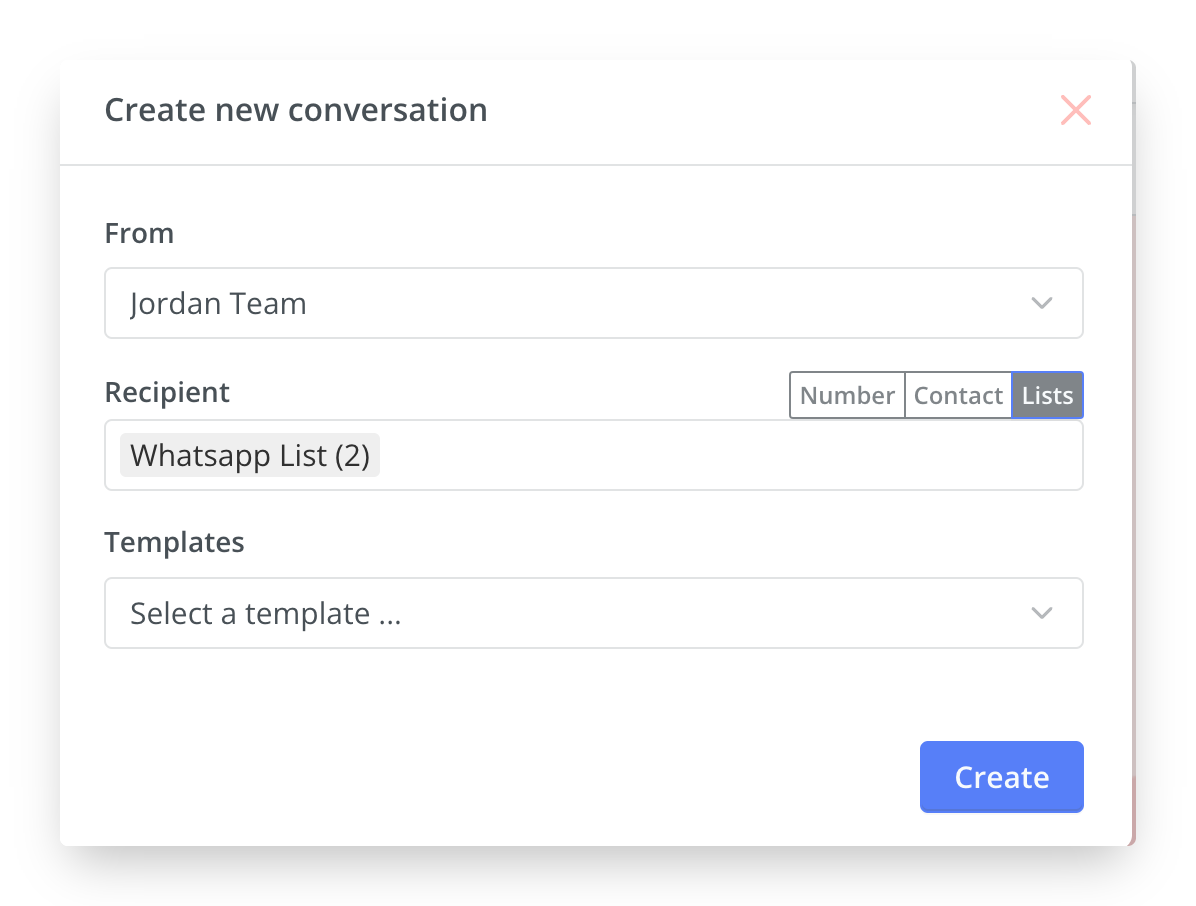
---
### ❓Frequently Asked Questions
#### **Can we send promotional messages on WhatsApp?**
Yes, since September 2021, WhatsApp allowed businesses to send WhatsApp promotional messages. Businesses can send promotional messages to Unlimited users with WhatsApp Business API integration.
You can send these messages only to users who've opted-in for receiving WhatsApp notifications from your business.
#### **How to write a good promotional message on Whatsapp?**
Follow the guidelines for Whatsapp Templates here on[Message Templates Guidelines and Reasons for Rejection](https://developers.facebook.com/docs/whatsapp/message-templates/guidelines/)
#### **How to send bulk marketing messages on Whatsapp?**
WhatsApp Business API allows businesses to send marketing messages to Unlimited users in one go. Enabling Maqsam-Whatsapp integration, you can send promotional messages in bulk easily using approved marketing templates.
You can send these messages to users who've opted-in for receiving WhatsApp notifications from your business.
#### **How to create lists for marketing and promotional messages?**
Lists for marketing messaging purposes can be created from the phonebook where contacts are selected and added to a list.
Lists later can be selected from Whatsapp template sending pop up to be sent after selecting the template.
#### **Can lists be updated?**
Yes, lists can be updated, edited and removed from the phonebook.
- [Getting Started](https://support.maqsam.com/getting-started?hsLang=en)
- [Administration](https://support.maqsam.com/administration?hsLang=en#main-content)
- [💳 Billing & Payments](https://support.maqsam.com/administration?hsLang=en#billing-payments)
- [⚙️ Account Settings](https://support.maqsam.com/administration?hsLang=en#%EF%B8%8F-account-settings)
- [Voice](https://support.maqsam.com/voice?hsLang=en#main-content)
- [🔀 IVR Builder](https://support.maqsam.com/voice?hsLang=en#ivr-builder)
- [📞 All Voice Features](https://support.maqsam.com/voice?hsLang=en#all-voice-features)
- [Messaging](https://support.maqsam.com/messaging?hsLang=en#main-content)
- [💬 WhatsApp](https://support.maqsam.com/messaging?hsLang=en#whatsapp)
- [Integrations](https://support.maqsam.com/integrations?hsLang=en#main-content)
- [🔌 HubSpot Integration](https://support.maqsam.com/integrations?hsLang=en#hubspot-integration)
- [🔌 Pipedrive Integration](https://support.maqsam.com/integrations?hsLang=en#pipedrive-integration)
- [🔌 Intercom Integrtion](https://support.maqsam.com/integrations?hsLang=en#intercom-integrtion)
- [🔌 Zendesk Integration](https://support.maqsam.com/integrations?hsLang=en#zendesk-integration)
- [🔌 FreshDesk Integration](https://support.maqsam.com/integrations?hsLang=en#freshdesk-integration)
- [🔌 Salesloft Integration](https://support.maqsam.com/integrations?hsLang=en#salesloft-integration)
- [🔌 Salesforce Integration](https://support.maqsam.com/integrations?hsLang=en#salesforce-integration)
- [🔌 Zoho Phonebridge Integration](https://support.maqsam.com/integrations?hsLang=en#zoho-phonebridge-integration)
- [Artificial Intelligence](https://support.maqsam.com/artificial-intelligence?hsLang=en#main-content)
- [AI Agent Studio](https://support.maqsam.com/artificial-intelligence?hsLang=en#ai-agent-studio)
- [Reports](https://support.maqsam.com/reports?hsLang=en)
- [Legal & Compliance](https://support.maqsam.com/legal-compliance?hsLang=en)
- [FAQs](https://support.maqsam.com/faqs?hsLang=en#main-content)
- [🔌 Integrations](https://support.maqsam.com/faqs?hsLang=en#integrations)
- [⚙️ Accounts](https://support.maqsam.com/faqs?hsLang=en#%EF%B8%8F-accounts)
- [💬 Messaging](https://support.maqsam.com/faqs?hsLang=en#messaging)
- [💳 Payments](https://support.maqsam.com/faqs?hsLang=en#payments)
- [📞 Voice](https://support.maqsam.com/faqs?hsLang=en#voice)
- [✅ Troubleshooting](https://support.maqsam.com/faqs?hsLang=en#troubleshooting)
[](https://maqsam.com/)
Copyright © 2026, Maqsam