---
title: IVR Builder Overview
description: Create and manage IVR call flows with Maqsam’s drag-and-drop IVR Builder. Automate call routing, messaging, and voicemail efficiently.
---
[Skip to content](https://support.maqsam.com/ivr-builder-overview#main-content)
- [English](https://support.maqsam.com/ivr-builder-overview)
- [العربية](https://support.maqsam.com/ar/ivr-builder-overview)
English
Show submenu for translations
[](https://support.maqsam.com?hsLang=en)
Open main navigation
Close main navigation
- - [English](https://support.maqsam.com/ivr-builder-overview)
- [العربية](https://support.maqsam.com/ar/ivr-builder-overview)
English
Show submenu for translations
Welcome to Maqsam
- There are no suggestions because the search field is empty.
1. [Welcome to Maqsam](https://support.maqsam.com/?hsLang=en)
2. [Voice](https://support.maqsam.com/voice?hsLang=en)
3. [🔀 IVR Builder](https://support.maqsam.com/voice?hsLang=en#ivr-builder)
# IVR Builder Overview
## Learn how to create and manage dynamic call flows with Maqsam’s IVR Builder, automating call routing and integrating messaging seamlessly.
### 🔍 **Overview of IVR Builder**
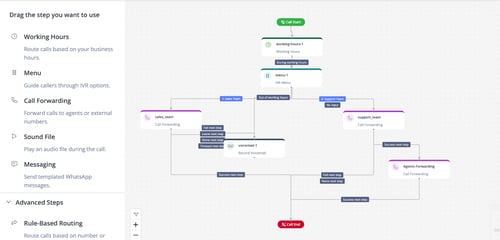
The **IVR (Interactive Voice Response) Builder** in Maqsam allows you to **create dynamic and customized call flows** using a **drag-and-drop** interface. It provides an intuitive way to automate call handling, route calls based on conditions, and integrate messaging and voicemail functionalities seamlessly.
Watch this **quick video tutorial** to see how to create and manage IVR flows in Maqsam:
With the IVR Builder, **you are able to do the following:**
- 🎨 Design call flows visually using predefined steps.
- ⚙️ Configure each step with custom settings.
- 🔁 Automate routing based on caller inputs, business hours, or other criteria.
- 📞 Integrate voice messages, call forwarding, and messaging actions.
---
### ✨ **Key Details**
#### **IVR Builder Sections:**
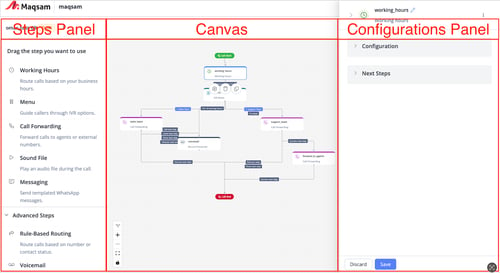
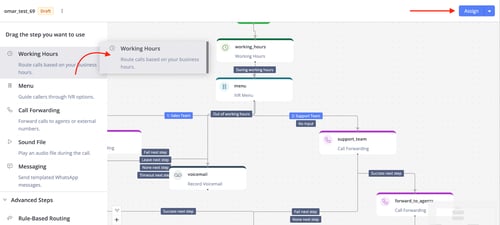
- **Steps Panel (Left Side):** Contains all available IVR steps to add to your flow.
- **Canvas (Center):** Main working area for connecting and arranging steps.
- **Configuration Panel (Right Side):** Displays settings for the selected step.
#### **Available IVR Steps:**
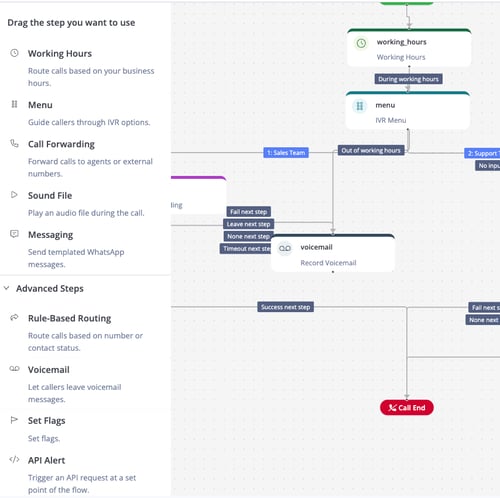
Each IVR flow is built using predefined steps that perform specific actions. Below are the key steps available in Maqsam’s IVR Builder:
- **🕒 Working Hours:** Direct calls based on business hours.
- **📋 Menu:** Present options for callers (e.g., "Press 1 for Sales, 2 for Support").
- **🔁 Call Forwarding:** Route calls to agents, groups, or external numbers.
- **🔊 Sound File:** Play an uploaded or library-stored audio file.
- **💬 Messaging:** Send automated WhatsApp messages to callers.
- **🧠 Rule-Based Routing:** Route calls based on predefined rules like number formatting or phonebook status.
- **📥 Voicemail:** Allow callers to leave recorded messages.
- **🏷️ Set Flags:** Tag calls at specific points in the flow.
- **🔗 Webhook:** Send API requests to external systems.
---
### ⚙️ **How to Access the IVR Builder**
Follow these steps below to access the IVR builder:
1. Log in to your Maqsam account.
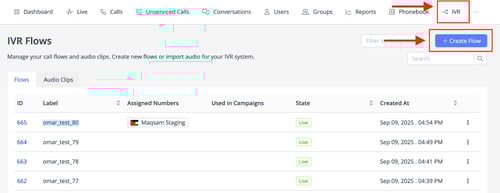
2. Navigate to the **IVR** page from the Maqsam portal.
3. Click **“Create Flow”** to start a new IVR flow.
4. The drag-and-drop IVR Builder will open for you to design your flow.
💡 **Tip**: Name your flow something descriptive like "Support Line IVR" to keep things organized.
---
### ⚙️ **How to Create Your IVR Flow**
1. **Define** your call flow requirements based on your IVR planning.
2. **Explore** available steps and choose the ones you need.
3. **Drag** a step from the left panel onto the canvas.
4. **Connect** steps visually to define the flow.
5. **Click** on a step to configure its settings in the right-side panel.
6. **Configure** details such as sound files, next steps, or routing rules.
7. **Save** your changes.
8. **Assign** your flow to a phone number to activate it.
---
### 📌 **Notes**
- Planning your IVR flow ahead ensures smooth and logical call routing.
- Consider call handling, caller interactions, and flow automation requirements before building.
---
### 💡 **Tips**
- Name your flow descriptively (e.g., “Support Line IVR”) for easy organization.
- Answer questions about call paths, data collection, fallback options, and automated messages to make your IVR user-friendly.
- [Getting Started](https://support.maqsam.com/getting-started?hsLang=en)
- [Administration](https://support.maqsam.com/administration?hsLang=en#main-content)
- [💳 Billing & Payments](https://support.maqsam.com/administration?hsLang=en#billing-payments)
- [⚙️ Account Settings](https://support.maqsam.com/administration?hsLang=en#%EF%B8%8F-account-settings)
- [Voice](https://support.maqsam.com/voice?hsLang=en#main-content)
- [🔀 IVR Builder](https://support.maqsam.com/voice?hsLang=en#ivr-builder)
- [📞 All Voice Features](https://support.maqsam.com/voice?hsLang=en#all-voice-features)
- [Messaging](https://support.maqsam.com/messaging?hsLang=en#main-content)
- [💬 WhatsApp](https://support.maqsam.com/messaging?hsLang=en#whatsapp)
- [Integrations](https://support.maqsam.com/integrations?hsLang=en#main-content)
- [🔌 HubSpot Integration](https://support.maqsam.com/integrations?hsLang=en#hubspot-integration)
- [🔌 Pipedrive Integration](https://support.maqsam.com/integrations?hsLang=en#pipedrive-integration)
- [🔌 Intercom Integrtion](https://support.maqsam.com/integrations?hsLang=en#intercom-integrtion)
- [🔌 Zendesk Integration](https://support.maqsam.com/integrations?hsLang=en#zendesk-integration)
- [🔌 FreshDesk Integration](https://support.maqsam.com/integrations?hsLang=en#freshdesk-integration)
- [🔌 Salesloft Integration](https://support.maqsam.com/integrations?hsLang=en#salesloft-integration)
- [🔌 Salesforce Integration](https://support.maqsam.com/integrations?hsLang=en#salesforce-integration)
- [🔌 Zoho Phonebridge Integration](https://support.maqsam.com/integrations?hsLang=en#zoho-phonebridge-integration)
- [Artificial Intelligence](https://support.maqsam.com/artificial-intelligence?hsLang=en#main-content)
- [AI Agent Studio](https://support.maqsam.com/artificial-intelligence?hsLang=en#ai-agent-studio)
- [Reports](https://support.maqsam.com/reports?hsLang=en)
- [Legal & Compliance](https://support.maqsam.com/legal-compliance?hsLang=en)
- [FAQs](https://support.maqsam.com/faqs?hsLang=en#main-content)
- [🔌 Integrations](https://support.maqsam.com/faqs?hsLang=en#integrations)
- [⚙️ Accounts](https://support.maqsam.com/faqs?hsLang=en#%EF%B8%8F-accounts)
- [💬 Messaging](https://support.maqsam.com/faqs?hsLang=en#messaging)
- [💳 Payments](https://support.maqsam.com/faqs?hsLang=en#payments)
- [📞 Voice](https://support.maqsam.com/faqs?hsLang=en#voice)
- [✅ Troubleshooting](https://support.maqsam.com/faqs?hsLang=en#troubleshooting)
[](https://maqsam.com/)
Copyright © 2026, Maqsam