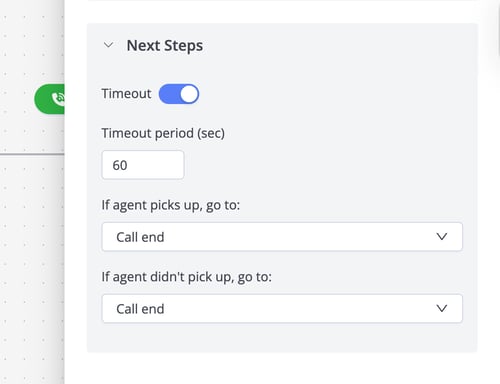
🔍 Overview of Forwarding Calls to Phone Numbers
The Call Forwarding step routes your incoming calls to agents, groups, or external phone numbers so that callers get help quickly and efficiently. This article will talk about the option of forwarding calls to phone numbers (external numbers).
Note: Use this option to route calls outside the system. For example, to personal mobile numbers of agents.
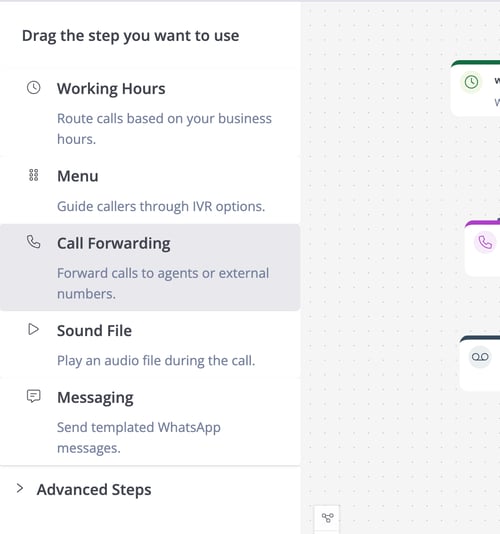
⚙️ Configurations
Below are the available configuration options for forwarding calls to phone numbers (external numbers):
🔁 Tries
Specifies the number of attempts the system makes to connect a call if the configured phone number does not answer. If the first phone number is unavailable, the system retries with another phone number randomly.
Example: If set to 3 tries, the system attempts to connect the call to three different numbers before moving to the next step. Attempts will be made to add the phone numbers randomly.
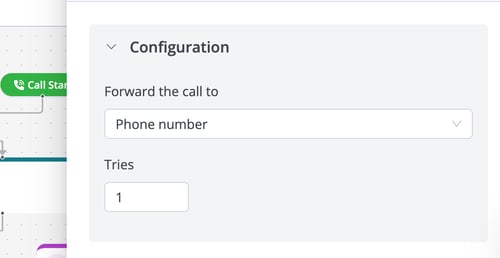
📱 Destination
List the phone numbers to receive forwarded calls. Multiple numbers can be configured, and the system chooses a random number from the list to route the call to it.
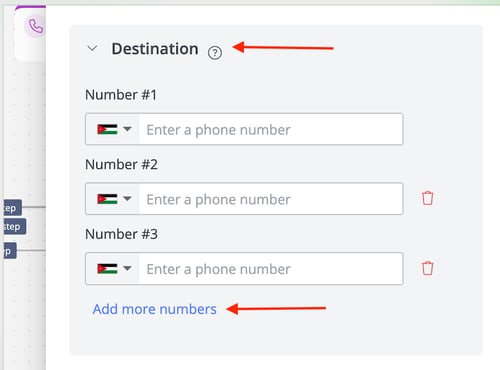
🧩 Next Steps Configurations
Here you decide what happens next depending on the situation:
- Timeout (seconds): Duration (in seconds) the caller waits in the queue before triggering the timeout step.
- Example: IVR waits 10 seconds before → If the agent didn't pick up, go to: Voicemail.
- Timeout Step: Defines the IVR step that the call will move to if the caller is still in the queue and the waiting time has exceeded the timeout.
- If the agent picks up, go to: Define the IVR step after an agent answers and completes the call.
- Example: Move to a survey step to collect caller feedback.
- If the agent didn't pick up, go to: Define the IVR step that the call will move to if there are available agents and no one has answered the call.