
🔍 Overview
This guide walks you through the process of creating a Voice AI Agent on the Maqsam AI Agent platform.
The AI Agent creation wizard consists of four steps:
-
Agent Information
-
Agent Behavior
-
Company Information
-
Agent Review
By the end of this guide, your AI Agent will be ready for testing and deployment.
✅ Prerequisites
Before creating an AI Agent, make sure you have:
-
Access to your Maqsam account.
-
Your company name and business information available.
-
A clear understanding of the AI Agent's purpose (for example: customer support, sales, appointment booking, or lead qualification).
-
A complete understanding of the scenarios the AI Agent should handle during calls.
🚀 Access the AI Agent Portal
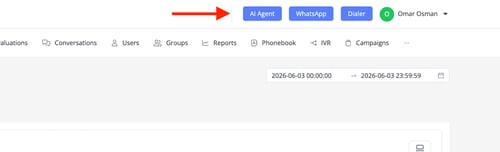
In your Maqsam portal, locate the AI Agent button in the top-right corner of the screen, next to your profile name.
⚙️ Step 1: Agent Information
This step defines the AI Agent's identity and voice.
During this step, you will configure:
-
Agent Profile: (Agent Name, Job Title, Personality Traits)
-
Agent Voice: (Voice Model, Speech Speed)
-
Pronunciation Dictionary:(Global Pronunciation Dictionary, Custom Pronunciation Entries, CSV Upload)
For the full steps, please go to this article here: Configuring Agent Information.
⚙️ Step 2: Agent Behavior
This step defines how the AI Agent interacts with callers during a conversation.
During this step, you will configure:
-
Greeting Messages
-
AI Agent Interruption
-
Actions (Call End, Escalation Methods)
-
Guardrails
-
Instructions
For the full steps, please go to this article here: Configuring Agent Behavior.
⚙️ Step 3: Company Information
This step provides the AI Agent with information about your company, business, contact methods, and knowledge sources.
During this step, you will configure:
-
Company Details: (Company Name, Company Website, Business Context)
-
Contact Details (WhatsApp Number, Contact Email, Phone Number)
-
Knowledge Base Documents
For the full steps, please go to this article here: Configuring Company Information.
⚙️ Step 4: Agent Review
Before creating the AI Agent, review the configuration summary displayed on the screen.
Please review the following:
-
Personality Traits
-
Guardrails
-
Instructions
-
General Agent Configuration
For the full steps, please go to this article here: Reviewing Agent Configuration.
If changes are required, click Previous to return to any previous step.
When you are satisfied with the configuration, click Finish.
The AI Agent will then be created and saved.
🎉 After Creating the AI Agent
After the AI Agent is created, it will appear in the AI Voice Agents list.
From there, you can:
-
Test the AI Agent.
-
Edit the AI Agent.
-
Duplicate the AI Agent.
-
Delete the AI Agent.
-
Review Call Logs.
💡 Best Practice
Before deploying an AI Agent to production, perform multiple test calls to verify:
-
The AI Agent responds as expected.
-
Knowledge Base documents are being used correctly.
-
Escalation flows work properly.
-
Guardrails and instructions are followed consistently.
- Review the Call Logs after testing and make any necessary adjustments before deployment.