
Our Call Conferencing API allows you to seamlessly conference multiple parties together on a single call with the ability to hide each party’s number from the other party (call masking) for higher privacy measures. 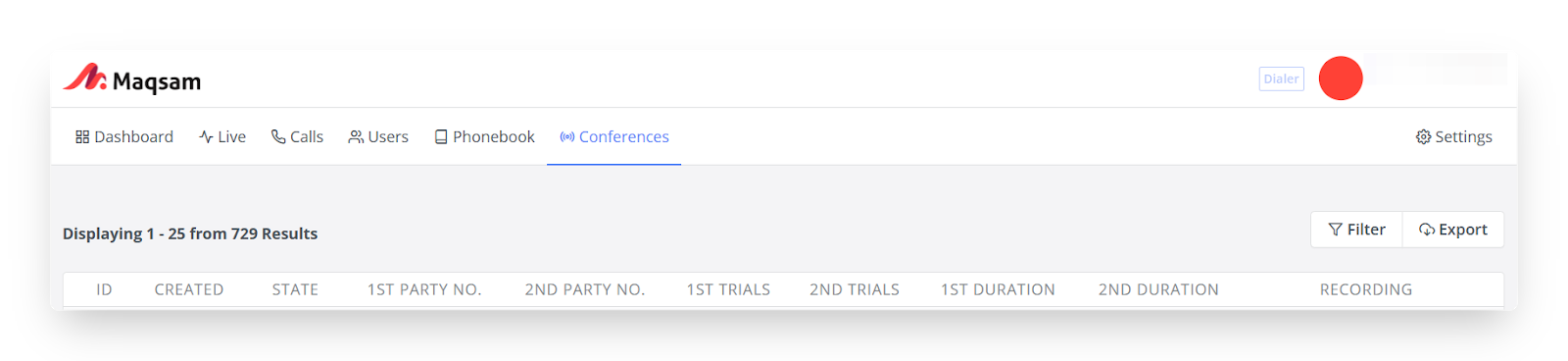
This page will allow you to filter for conference calls and export your conference calls.
The Conferences tab will include the below information:
-
ID: Each conference call has its own unique ID.
-
Created: Shows you the exact time of the call.
-
State: Shows you the state of the call. (Initialized, Awaiting First Party, Awaiting Second Party, In Conference, Closing, Terminated, Awaiting Confirm.)
-
1st Part No.: the phone number of the first party to connect to, in international format.
-
2nd Part No.: the phone number of the second party to connect to, in international format.
-
1st Trials: the number of times to retry calling the first party before aborting the conference.
-
2nd Trials: the number of times to retry calling the second party before aborting the conference.
-
1st Duration: 1st party’s duration.
-
2nd Duration: 2nd party’s duration.
-
Recording: The full recording of the talk time between the two parties.
The filter tab will include the below information:
Call States: Search for the Conference call based on the state (Initialized, Awaiting First Party, Awaiting Second Party, In Conference, Closing, Terminated, Awaiting Confirm). Kindly check states map below.
First Party/Second Party: Search based on the phone number of the party contacted.
Date Range: Search for Conference calls in a specific time period.
How To Create Conferences
In order to allow conference API on your account, follow the steps below:
-
Contact Maqsam support at support@maqsam.com to enable API access on your account.
-
Generate |access_key_id| and |access_secret| combination from the account settings; by going to account Settings > API Credentials > Generate API key.
-
Implement the Conference API through this documentation.
Please ensure your technical team thoroughly reviews the documentation to verify full implementation on your end.
❗Please ensure your technical team thoroughly reviews the documentation to verify full implementation on your end.