---
title: Trasnactions
description: Review card and PayPal transactions, check payment statuses, understand failure reasons, and find the steps needed to resolve failed payments.
---
[Skip to content](https://support.maqsam.com/trasnactions#main-content)
- [English](https://support.maqsam.com/trasnactions)
- [العربية](https://support.maqsam.com/ar/trasnactions)
English
Show submenu for translations
[](https://support.maqsam.com?hsLang=en)
Open main navigation
Close main navigation
- - [English](https://support.maqsam.com/trasnactions)
- [العربية](https://support.maqsam.com/ar/trasnactions)
English
Show submenu for translations
Welcome to Maqsam
- There are no suggestions because the search field is empty.
1. [Welcome to Maqsam](https://support.maqsam.com/?hsLang=en)
2. [Administration](https://support.maqsam.com/administration?hsLang=en)
3. [💳 Billing & Payments](https://support.maqsam.com/administration?hsLang=en#billing-payments)
# Trasnactions
### **🔍 Overview of Transactions**
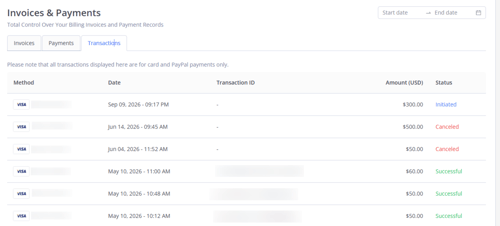
The **Transactions** tab gives users who have the **Account Settings** permission enabled a clear record of the payments Maqsam has attempted to collect against your billing and subscription plan. It shows every charge, its exact status, and - when a payment doesn't go through - the reason it failed and the action needed to resolve it.
***Note****: The Transactions tab covers* ***card and PayPal payments only****. Payments made through other methods are not listed here.*
With the **Transactions** tab, **you are able to do the following:**
- 🔎 Review every card and PayPal charge attempted on your account.
- 📅 Filter charges by a date range, or view them all at once.
- 🚦 See the live status of each transaction at a glance.
- ⚠️ Understand why a payment failed and exactly what to do next.
---
### **⚙️ How to View Your Transactions**
1. Log in to your Maqsam account.
2. Click the **Settings** button.
3. Navigate to **Account Settings** \> **Billing**.
4. Select **Invoices & Payments**.
5. Click on the **Transactions** tab.
6. Choose the desired period by selecting the **Date From** and the **Date To**, or leave it unset to see everything.
7. Your latest charges appear at the top of the page, each with its status.
---
### **✨ Transaction Statuses**
Every transaction carries one of the following statuses:
| **Status** | **What it means** |
| --- | --- |
| **Initiated** | The transaction has just been created. |
| **Processing** | The transaction is being processed and isn't finalized yet -- it takes some time before it becomes either successful or failed. |
| **Successful** | The payment succeeded and the amount has been deducted from your card. |
| **Failed** | The payment failed for a specific reason. Find the reason and the required action below. |
| **Canceled** | The transaction was cancelled by one of the parties. |
---
### **⚠️ Failure Reasons & What to Do**
When a transaction shows **Failed**, the message next to it tells you what happened and exactly what to do next:

| **What happened** | **What to do next** |
| --- | --- |
| **Insufficient funds.** | Please use a different card or add funds to your card. |
| **Your card has expired.** | Please update it with your new card's details or use a different card. |
| **The card details are incorrect.** | Please check your entered card details and try again. |
| **Additional verification is required.** | Please complete the verification and try again. |
| **A temporary error occurred.** | Please try again in a few minutes. |
| **Your card was declined.** | Please contact your bank or use a different card. |
| **The payment failed for unknown reasons.** | Please try again or use a different payment method. |
---
### **💡 Tips**
- Choose a specific date range when you need to reconcile a particular billing period.
- [Getting Started](https://support.maqsam.com/getting-started?hsLang=en#main-content)
- [Phonebook](https://support.maqsam.com/getting-started?hsLang=en#phonebook)
- [Administration](https://support.maqsam.com/administration?hsLang=en#main-content)
- [💳 Billing & Payments](https://support.maqsam.com/administration?hsLang=en#billing-payments)
- [⚙️ Account Settings](https://support.maqsam.com/administration?hsLang=en#%EF%B8%8F-account-settings)
- [Voice](https://support.maqsam.com/voice?hsLang=en#main-content)
- [🔀 IVR Builder](https://support.maqsam.com/voice?hsLang=en#ivr-builder)
- [📞 All Voice Features](https://support.maqsam.com/voice?hsLang=en#all-voice-features)
- [Messaging](https://support.maqsam.com/messaging?hsLang=en#main-content)
- [💬 WhatsApp](https://support.maqsam.com/messaging?hsLang=en#whatsapp)
- [Integrations](https://support.maqsam.com/integrations?hsLang=en#main-content)
- [🔌 HubSpot Integration](https://support.maqsam.com/integrations?hsLang=en#hubspot-integration)
- [🔌 Pipedrive Integration](https://support.maqsam.com/integrations?hsLang=en#pipedrive-integration)
- [🔌 Intercom Integrtion](https://support.maqsam.com/integrations?hsLang=en#intercom-integrtion)
- [🔌 Zendesk Integration](https://support.maqsam.com/integrations?hsLang=en#zendesk-integration)
- [🔌 FreshDesk Integration](https://support.maqsam.com/integrations?hsLang=en#freshdesk-integration)
- [🔌 Salesloft Integration](https://support.maqsam.com/integrations?hsLang=en#salesloft-integration)
- [🔌 Salesforce Integration](https://support.maqsam.com/integrations?hsLang=en#salesforce-integration)
- [🔌 Zoho Phonebridge Integration](https://support.maqsam.com/integrations?hsLang=en#zoho-phonebridge-integration)
- [Artificial Intelligence](https://support.maqsam.com/artificial-intelligence?hsLang=en#main-content)
- [AI Agent Studio](https://support.maqsam.com/artificial-intelligence?hsLang=en#ai-agent-studio)
- [Reports](https://support.maqsam.com/reports?hsLang=en)
- [Legal & Compliance](https://support.maqsam.com/legal-compliance?hsLang=en)
- [FAQs](https://support.maqsam.com/faqs?hsLang=en#main-content)
- [🔌 Integrations](https://support.maqsam.com/faqs?hsLang=en#integrations)
- [⚙️ Accounts](https://support.maqsam.com/faqs?hsLang=en#%EF%B8%8F-accounts)
- [💬 Messaging](https://support.maqsam.com/faqs?hsLang=en#messaging)
- [💳 Payments](https://support.maqsam.com/faqs?hsLang=en#payments)
- [📞 Voice](https://support.maqsam.com/faqs?hsLang=en#voice)
- [✅ Troubleshooting](https://support.maqsam.com/faqs?hsLang=en#troubleshooting)
[](https://maqsam.com/)
Copyright © 2026, Maqsam